• TRUSTED RESEARCH

    TRUSTED RESEARCH | STRATEGIC INSIGHT

    SMB. CORE MIDMARKET. UPPER MIDMARKET. ECOSYSTEM
    LEARN MORE
  • INTERWORK 2.0: THE AGENTIC FUTURE OF CONNECTED BUSINESS

    INTERWORK 2.0: THE AGENTIC FUTURE OF CONNECTED BUSINESS

  • 2026 TOP 10 SMB BUSINESS ISSUES, IT PRIORITIES, IT CHALLENGES

    2026 TOP 10 SMB BUSINESS ISSUES, IT PRIORITIES, IT CHALLENGES

  • 2026 TOP 10 SMB PREDICTIONS

    2026 TOP 10 SMB PREDICTIONS

    SMB & Midmarket: Autonomous Business
    READ
  • 2026 TOP 10 PARTNER PREDICTIONS

    2026 TOP 10 PARTNER PREDICTIONS

    Partner & Ecosystem: Next Horizon
    READ
  • ARTIFICIAL INTELLIGENCE

    ARTIFICIAL INTELLIGENCE

    SMB & Midmarket Analytics & Artificial Intelligence Adoption
    LEARN MORE
  • IT SECURITY TRENDS

    IT SECURITY TRENDS

    SMB & Midmarket Security Adoption Trends
    LATEST RESEARCH
  • BUYERS JOURNEY

    BUYERS JOURNEY

    Technology Buyer Persona Research
    LEARN MORE
  • PARTNER ECOSYSTEM

    PARTNER ECOSYSTEM

    Global Channel Partner Trends
    LATEST RESEARCH
  • CLOUD ADOPTION TRENDS

    CLOUD ADOPTION TRENDS

    SMB & Midmarket Cloud Adoption
    LATEST RESEARCH
  • FUTURE OF PARTNER ECOSYSTEM

    FUTURE OF PARTNER ECOSYSTEM

    Networked, Engaged, Extended, Hybrid
    DOWNLOAD NOW
  • MANAGED SERVICES RESEARCH

    MANAGED SERVICES RESEARCH

    SMB & Midmarket Managed Services Adoption
    LEARN MORE

Techaisle Analyst Insights

Trusted research and strategic insight decoding SMBs, the Midmarket, and the Partner Ecosystem.
Anurag Agrawal

Forget apps, SMBs increasing adoption of mobility management solutions

Techaisle’s 2015 SMB and Midmarket Mobility Solutions Adoption study shows that the trend towards increased diversity and sophistication of mobile app portfolios within SMBs is driving a concurrent requirement for enterprise mobility management solutions capable of automating management, security and infrastructure associated with complex mobile portfolios.

Although much of the public debate around mobility involves hardware brands and feature sets and overall penetration rates and even BYOD (which is now passé), the real business benefit of mobility is delivered via applications that address specific task requirements within the business, and mobility management solutions that overlay the management and security structures needed to integrate these apps with corporate IT systems.

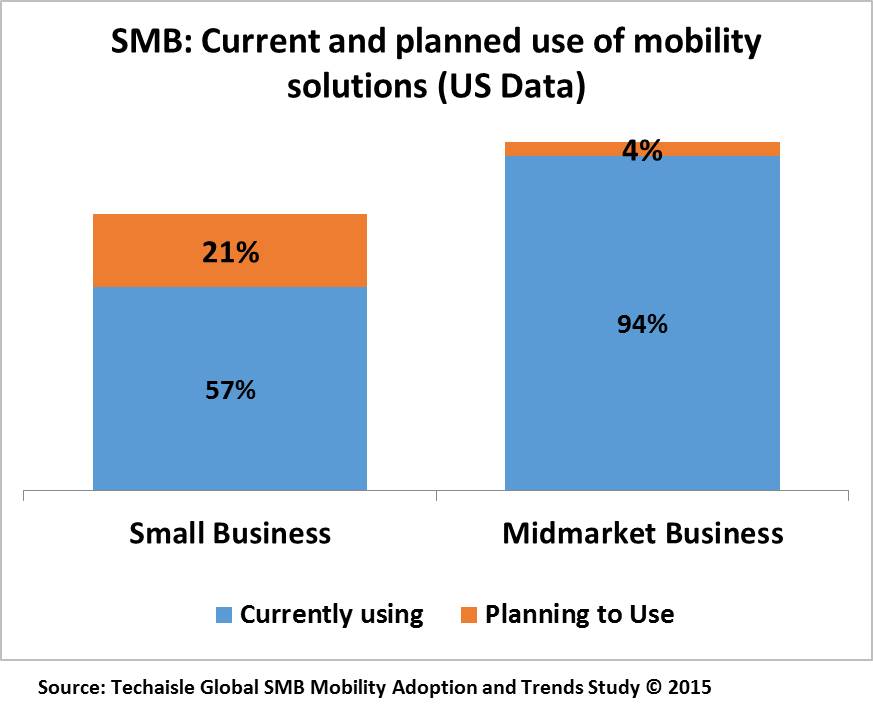
Figure below provides a snapshot of current and planned usage of mobility solutions. It shows that today, use of mobility solutions has crossed 50% in the small business segment, and that aggressive 2015 purchase plans – especially amongst 1-9 employee and 10-19 employee microbusinesses – will boost this figure closer to 80% in the near term. Initial penetration is nearly complete within midmarket enterprises, where well over 90% report current use of mobility solutions.

techaisle-smb-current-planned-use-mobility-solutions

Focusing on Enterprise Mobility Management Solutions

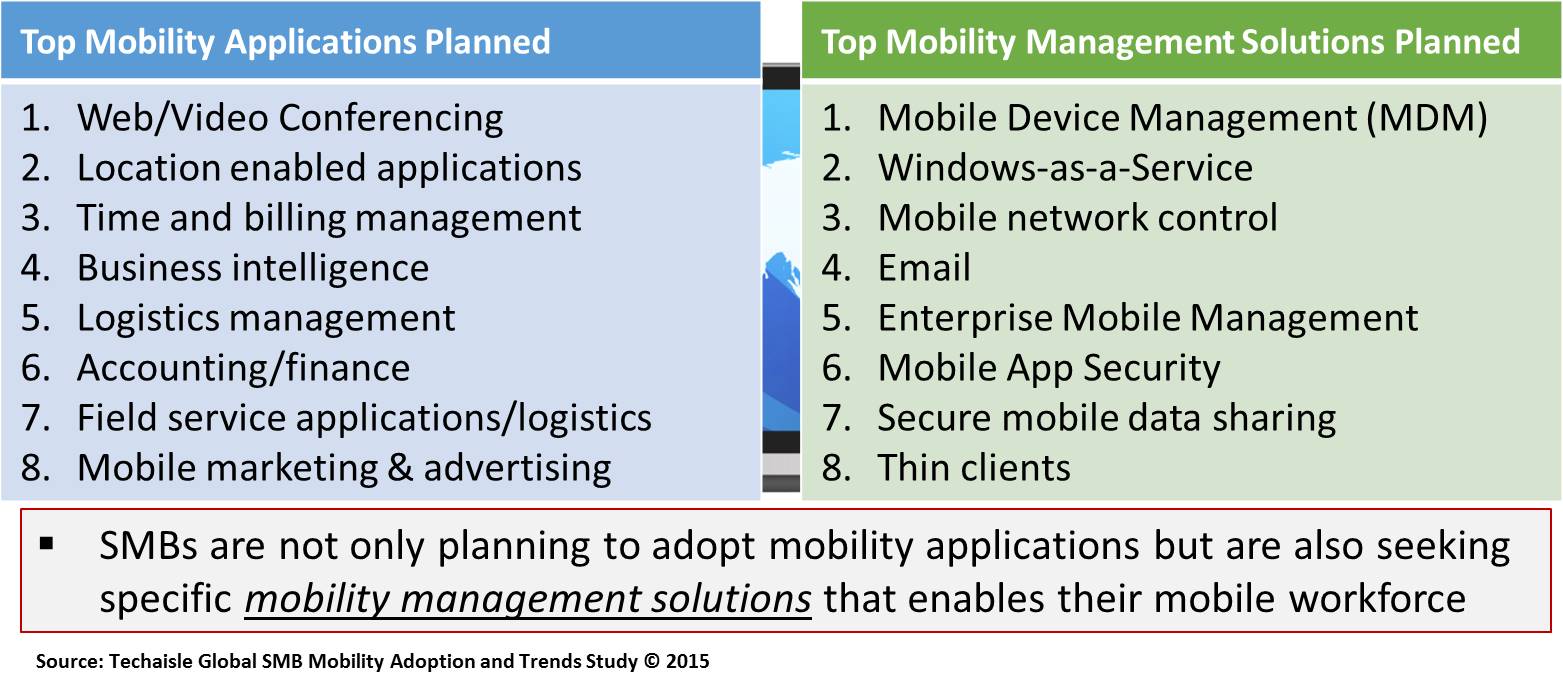
Consider the perspective included in the figure below. The left-hand text box includes eight mobility application categories predicted (by the Techaisle SMB 2015 Mobility survey) to have the greatest increase in adoption in the next one year. Half of the list is comprised of advanced applications: web/video conferencing (foundational), location-enabled applications and mobile marketing and advertising (emerging technologies) and business intelligence (second-order application). The SMB mobile application portfolio is both growing explosively and becoming more complex.

techaisle-smb-seeking-mobility-management-solutions

The right hand side of figure highlights the top mobility management solutions that SMBs are investing in to automate control of these sprawling assets. This list includes security solutions (MDM, mobile app security, secure mobile data sharing) that address widespread concern over the exposure that accompanies mobility, as well as methods of automating management (mobile network control, enterprise mobile management) and of deploying infrastructure tuned to the needs of mobile workers (Windows-as-a-Service, thin clients). Also included on this list is email, which is in the process of making the leap from an application that is accessed remotely to an integrated solution that connects seamlessly across environments and devices – a progression that will likely occur with other applications (especially foundational applications) over time.

This link between more sophisticated mobile deployments and the need to invest in mobility solutions to provide for management, security and infrastructure is apparent in survey data outlining SMB use of and investments in mobile solutions.

However, mobility management solutions are not a “set it and forget it” type of technology. These solutions require continuous tuning and ongoing investment as their scope expands to match the burgeoning requirements of an increasingly-complex mobile environment. Techaisle 2015 SMB Mobility study data also captured expenditure levels for mobility solutions by employee size. Comparing this data and connecting the dots with Techaisle’s other data on cloud, virtualization, managed services and analytics we find that mobility drives increased IT investment, especially amongst small businesses and as a market force, mobility “grows the pie” of IT spending in the overall SMB market.

Upcoming blogs on SMB Mobility:

  • Mobility solution providers: not limited to traditional IT suppliers – VMware AirWatch, Citrix and IBM MaaS360 become important
  • What drives mobility solution supplier evaluation, especially in the midmarket?
  • What are the SMB IT challenges associated with mobile workforce support?
Anurag Agrawal

Dell VDI chief strategist on SMB market penetration game plan

Candid conversation with Dell Cloud-Client Computing chief strategist

Jeff McNaught, Executive Director & Chief Strategy Officer, Dell Cloud Client-Computing and co-inventor of Wyse thin client had a candid conversation with Techaisle on his new product initiatives, focus on security, building solutions for small and medium businesses and renewed attention to channel partners. Jeff is deeply involved in software solutions which includes partner software - Citrix, Microsoft and VMware and is responsible for the cloud-client business which includes devices that Dell build’s exclusively for Citrix or VMware as well as new products and software security offerings. One of his major new initiatives includes simplifying and securing virtual workspaces better than anyone else.

Dell VDI converging on security, cost, complexity and channels

Based on extensive primary research with SMBs and the channel partners, Techaisle forecasts the US SMB VDI market to be US$13 billion in 2020 as VDI penetration increases to 34 percent from the current 26 percent and an increase in number of seats from users who have already deployed VDI. Most of the midmarket firms that have invested in VDI are still experimenting with the technology, and most small businesses are still several years away from even this level of preliminary adoption.

The allure of VDI is clear – but the technology itself and the path to realizing its benefits is still mysterious to many small and midmarket businesses. Techaisle research shows that there is a need for VDI vendors to embark on a messaging exercise that includes - real-world examples of successful deployment of VDI, ease of VDI implementation with the least pain for SMBs & simplification of understanding VDI technology by removing fear and complexity.

Over the last two years Dell has been trying to build a momentum to remove the mystery and reduce deployment complexity. Along the way it has had more successes than missteps and it seems that Dell has reached a stage where it reasonably understands the needs of the end-customers and how to work with channel partners to win business and deploy solutions. Dell has architected multiple VDI solution delivery models for SMBs of all sizes and levels of technology adoption.

Anurag Agrawal

Citrix cloud drives a new solutions category: Mobile Delivery Infrastructure (MDI)

Steve Daheb, Chief Marketing Officer, Citrix, says, “Citrix is a cloud solutions company that enables mobile workstyles”. This philosophy’s execution is anchored to its three product pillars:

  1. XenDesktop
  2. Netscaler, and
  3. XenMobile

Citrix has committed itself to an ambitious definition of enterprise mobility, with a framework spanning nine components; customers can use Citrix technologies to create an integrated, single vendor solution covering all nine areas, or can opt to plug competing products into any of the nine areas – an approach that Citrix has labeled “any-ness.”


Mobile Delivery Infrastructure (MDI)

We believe that there is current demand in the market for a reasoned approach to defining enterprise mobility. The suppliers of the endpoint products aren’t in a position to define the architecture and services needed to connect their products to corporate networks, applications and data, and the suppliers of data center infrastructure lack visibility into the endpoint side of the equation. Citrix is unique in spanning both environments, and its approach to enabling customers is, in our opinion, well-aligned with the need for architectural clarity that we have observed in the market. Accordingly, using the Citrix framework as a starting point, we have created a definition of enterprise mobility that we have dubbed “Mobile Delivery Infrastructure,” or MDI. MDI is comprised of three distinct, critical solution pillars: endpoint tracking and security, collaboration and sharing, and app delivery and management.


Mobility Delivery Infrastructure (MDI)


Endpoint Tracking & Security


Collaboration & Sharing


App Delivery & Management


  • MDM
  • Mobile network control
  • Single Sign-on & Identity Management

  • Sandboxed mail
  • Secure mobile data sharing Collaboration

  • App dev tools
  • Mobile app security Windows-as-a-Service


Unsurprisingly, given our starting point, Citrix can be seen as a standard-setter for MDI. Its approach to MDI will likely attract many firms in search of a consistent approach: Citrix’s fundamental belief that work is not a place, simpler is better and any-ness wins will resonate with many customers looking for a starting point for a mobility framework.

The breadth of the Citrix portfolio will also help prospective customers to understand the requirement for the full breadth of MDI technologies. While many other cloud companies are developing either one solution or several for mobile workforce enablement, Citrix’s strategy seems akin to Microsoft’s during its formative years: it owned the platform (the operating system) for the PC, attracting an ecosystem of hardware, software and networking companies which built products and solutions extending the utility of the core product. To that extent, Citrix seems to have created a corporate mobility delivery infrastructure that can either be utilized stand alone or combined with other solutions.

SMB Market Potential

Citrix‘s main target has been the enterprise segment, which has served it well. It has yet to develop a coherent strategy for marketing and selling to the SMB segment, relying on partners to address the market. However, Techaisle research demonstrates that the SMB focused channel partners themselves want tremendous help from their vendors. For example US channel partner data clearly shows the help required on multiple fronts.

Nevertheless, the SMB market has huge potential with nearly 300 million mobile workers by 2016.The SMBs investing in mobile enablement will need MDI solutions to supporting these 300 million mobile workers – which will create demand for one or more solutions within Citrix’s MDI platform.


Techaisle outlook: We believe that mobility is transitioning from being defined by devices to being defined by management strategies – and that this will create demand for MDI. With products covering each aspect of MDI – and with an approach that supports both single-vendor and best-of-breed deployments – Citrix is extremely well positioned to benefit from this transition.


Anurag Agrawal

Seven Lessons for Successful deployment from Current SMB VDI and DaaS Users

Where is the market for client devices going – and what does it mean to corporate strategy? These are questions that Techaisle and its clients – and the industry as a whole – has been wrestling with ever since the decline of the traditional PC opened the door for alternative client technologies.

In many cases, users now combine mobile and fixed devices, and with this multi-device approach, consistency and security become even more important than they were in the laptop era. Many organizations are responding to a need to securely manage and distribute user data and applications by investigating virtual desktop (VDI) technologies enabling delivering of “desktop as a service,” or DaaS. With VDI/DaaS, businesses deploy client virtualization technologies from suppliers like Citrix and VMware to ensure that users have anywhere/any time/any device access to current information, their applications and their desktops. These technologies allow for better data security and auditability, and often offer the additional benefits of reduced CAPEX and OPEX.

The allure of VDI and DaaS is clear – but the technology itself and the path to realizing its benefits can still seem somewhat mysterious to many small and mid-sized businesses. To understand implementation challenges and lessons learned, Techaisle conducted depth interviews with small and mid-market businesses (from 50 employees to 999 employees) that are currently using VDI and/or DaaS solutions. Based on a random sampling these businesses belonged to financial services, professional services, manufacturing, construction, utilities, retail and private education segments. These early adopter SMBs have rolled out VDI and/or DaaS solutions within their organizations. The number of users using VDI and/or DaaS within the businesses interviewed ranged from a low of 30 employees for a small business to a high of 600 employees within a mid-market business.

Techaisle’s quantitative VDI/DaaS research shows that the key user objectives in adopting either on-premise or hosted VDI/DaaS solutions revolved around mobility, application availability from anywhere and on any device, disaster recovery, centralized management and administration of end-point devices at the same time reducing costs. Based on users’ real-world experiences and feedback, Techaisle has compiled a list of seven key lessons for success for small and mid-market businesses planning to adopt VDI/DaaS solutions.

1.       Prepare a roadmap of the solution and a blueprint of implementation process

Before starting the implementation process and before even considering a pilot, current VDI/DaaS users advise potential users to create a roadmap of the solution and a blueprint of implementation process. The roadmap and blueprints should include solution and brand selection criteria, a list of solution components and their objectives, changes required (if any) to the core infrastructure to support the solution, costs involved and budgets for cost overruns, security vulnerabilities, phase-in of users and their training process and timeframe for enhancements post implementation.

2.       Hire external consultants - people who have experience

It is almost impossible to develop a roadmap and blueprint without the guidance and close involvement of experts.  All SMBs that we interviewed had contracted with external consultants varying in size from a group of 4-5 to a maximum of 40-50 people. In each case, consultants were preferred over resellers and service providers due to their focused deep expertise and track record. However, each of the current users of VDI/DaaS had decided on either Citrix or VMware solution prior to engaging with consultants with corresponding expertise.

“We approached our known consultant which is a small company formed by 6 to 7 people and have expertise in VMware solution. They are highly technical professionals providing free infrastructure and free connectivity support and covering infrastructure maintenance and end user connectivity”.

“We preferred going with Consultants as they had solution specific expertise. They gave optimal options taking into consideration both cost and technology sound solution. They even offered technical assistance even after post implementation and maintenance for one year. They are a small company with VMware expertise formed by a core group of people”.

“We approached consultants, a small group of people, with deep Citrix expertise, because they had relevant qualifications and certification”.

3.       Ensure that the solution supports legacy software

Not all SMBs are using all modern applications; many mid-market businesses have core legacy applications and/or applications that are essential to a specific department and workgroup. Current SMB users of VDI/DaaS advise that the blueprint prepared should include a list of applications currently being used within the organization and to systematically test to ensure that they will continue to be supported in the new DaaS environment.

The VDI/DaaS SMB users also advise that businesses should also revisit the current licensing arrangement they have for some of their applications and ensure that in a virtualized environment those licenses are valid and applicable.

“We learned during the implementation phase that not every application is supported by VDI or DaaS solution. It is difficult to understand and analyze the amount of storage used by different departments”.

“The main concern was with software licensing concerns. Few of our application’ licenses restricted the use of software on systems accessed by terminal servers. There were issues coming up initially that affected our end users as these applications were not accessible on multiple virtual desktops”.

“The main concerns were the length of the project, the cost of the project and back end integration. Backend integration was a major concern as we have legacy application running on the system”.

4.       Get the business users ready

Business users do not like changes that affect their interfaces – it takes time to build new usage habits, and this can (and generally does) have a short-term impact on productivity. Although a VDI/DaaS roll-out is often used to deliver better mobile systems to business users – generally, a well-received benefit – it is essential to prepare the business users with new interfaces, log-ins, support mechanism, and training on the use of thin clients. This will require IT to manage a number of VDI/DaaS-specific issues, including application downloads to user devices, management of persistent or non-persistent desktop experiences, and tactics to address latency if/where it impacts performance.

“A challenge we faced post implementation was to manage new rounds of user trainings. The new solution meant introduction of a different system to the users and one where users had to undergo a series of trainings to become comfortable with it”.

“The main challenge that we faced was user training and that was a really big concern for us”. 

“We had to give training to users in about two weeks which was taken out of their operational hours and once the service was put in place the learning was steep, the users were not very productive during that time”.

“Most of the issues were to do with the users who were unable to come to terms with the changes and the content that could access easily”.

5.       Conduct a pilot

Conducting a pilot helps in fine tuning the roadmap and blueprint for implementation.

“During the pilot test, we observed a need to modify our terminal server as they were not responding to the end users request. Then we decided and made changes in terminal server by making a cluster of terminal servers so that similar end users request would be sent to desired terminal server, to cut down network traffic congestion”.

“At the initial stage we started facing issues which were basically related with bandwidth or poor network response. We decided to increase our bandwidth for offering end-users customizable experience similar to that of a physical desktop”.

“In the pilot stage some issues popped out. First of all, the expected cost for the pilot stage rose considerably. Also we got a mixed reaction from the team using it as some said they were able to fully utilize the resources, whereas when we tested it over other networks like WLAN, the data was not accessible”.

6.       Create a detailed budget, be prepared for cost overruns

The current users of VDI/DaaS suggest that potential adopters should budget 25 percent for software, 20 percent for services, 20 percent for networking and one-third for hardware. The percentages vary for small businesses where the budget allocation for hardware varies between 10-15 percent and the proportional cost of software rises to 30-35 percent. Current users advise businesses that have legacy applications to allocate higher budgets for hardware and services, as high as 45 percent and 35 percent respectively.

As many as 40 percent of SMBs indicate that cost overruns of 10-20 percent is a given.

“There was additional expenditure required. The testing phase was difficult as we had to change our server and switches”.

“In testing phase we found out that the users had to get software assurance which delayed the project, delayed purchase of licenses and forced additional expenditure”.

7.       Upgrade server and network infrastructure

The most common and almost universal changes to the IT infrastructure to prepare for VDI/DaaS usage are installation or upgrades of blade servers, upgrading cabling to fiber optics cable thus enabling substantially higher data bandwidth, replacement of switches for routing higher throughputs, installation of thin clients and in some cases increasing storage.

Current users generally opted for specific server and thin client brands based on either recommendation from their consultants or because of existing relationships. Brands most often used were IBM, HP and Dell. Most SMBs preferred to use Blade Servers.

“We upgraded cabling by using fiber optics cable which boosted our bandwidth and smooth flow of data from the data center to the end users. We used fiber optics as it was a cost effective solution for us rather than going on with existing metal cabling which had an impact on bandwidth”.

“Networking and replacement of cabling was one issue as it did not work with the solution initially, the cabling between the server switches and office switches and for this we looked for fiber cabling”.

Concluding observations

The need for VDI/DaaS as a mobility enabling technology is clear, and its corresponding benefits for user experience and data management are compelling. However, the path to VDI/DaaS can be tricky to navigate. By capitalizing on the advice provided by current users, SMBs interested in adopting VDI/DaaS can set realistic objectives and expectations, and can manage confidently towards effective deployment.

Trusted Research | Strategic Insight

Techaisle - TA